
Reviewed · BANGKOK
Thailand eSIM (3 to 30 days, up to 60GB)
The useful trick here is simple: you can land in Thailand with mobile data already waiting on your phone. This digital eSIM avoids an airport SIM counter, physical card swap, and possible language trouble when all you want is a map, a taxi app, or a message home.
I like two things in particular. First, setup is quick once the QR code arrives. Second, the plans cover short visits as well as month-long stays, with up to 60GB of high-speed data and 3G access after the fast data runs out. The main catch is timing: the QR code may not arrive automatically at once, so order at least the day before departure and confirm your phone supports eSIM.
In This Review
- Key points to know before buying
- Why an eSIM can make your Bangkok arrival easier
- The plan choices, from three days to a month
- Installing the QR code before you fly
- Phone compatibility is the make-or-break detail
- What the connection is good for in real use
- How the $5 price compares in practical terms
- Timing, cancellation, and the small details that matter
- Who should choose this Thailand eSIM
- Should you book the Thailand eSIM?
- FAQ
- How long do the Thailand eSIM plans last?
- How much high-speed data is included?
- What happens after the high-speed data is used?
- When should I set up the eSIM?
- How do I receive the eSIM?
- Does my phone need to support eSIM?
- Is there a pickup location or meeting point?
- Can I cancel for a full refund?
Key points to know before buying

- Choose from 3 to 30 days: The plan length can match a long weekend, a two-week holiday, or a month in Thailand.
- Use up to 60GB of high-speed data: After the stated high-speed allowance, your connection changes to 3G rather than stopping altogether.
- Install by QR code: The eSIM is emailed to you, then added to your phone by scanning the code.
- Activate after landing: Install the profile on your departure day, then enable the data plan and data roaming when you reach Thailand.
- Check your phone first: Compatible examples include iPhone XS and newer, Pixel 3 and later, and Samsung S20, S21, and Fold models.
- Expect a data-only product: The package provides mobile internet access, not a physical SIM pickup or an in-person meeting.
Why an eSIM can make your Bangkok arrival easier
Bangkok is easier to manage when your phone works the moment you leave the aircraft. You can check directions, contact family, open a ride service, translate a sign, or look up an address without searching for airport Wi-Fi.
That is the main value of this product. It is not a sightseeing tour with a guide or a set route. The listed meeting point and midnight start time are administrative details for a digital service. There is no pickup, meetup, or return transfer. You receive the eSIM by email and use it on your own device.
I like this arrangement for a first day in Thailand. Airport SIM purchases are often straightforward, but they still take time. You may need to find the correct counter, explain how long you need service, hand over your phone, and wait while someone activates the card. With an eSIM, much of that work happens before you leave home.
The tradeoff is that you must handle the setup yourself. If your phone is locked to a carrier or does not support eSIM, the product will not solve your connectivity problem. Check before booking, and ask the provider if you are unsure.
Other Bangkok outings people book alongside this one:
- Bangkok: Damnoen Saduak Market and Maeklong Railway Market
★ 4.5 · 26,723 reviews - The Old Siam: Damnoen Saduak and Maeklong Railway Market
★ 4.5 · 10,992 reviews - From Bangkok: Ayutthaya Temples Guided Tour with Lunch
★ 4.7 · 10,535 reviews
The plan choices, from three days to a month
The available options are designed around the length of your stay. The information provided describes plans from 3 to 30 days, while the general summary also mentions 1 to 30 days. Because those details do not fully match, confirm the exact duration options and data allowance shown for your selected plan before paying.
The title refers to plans of up to 60GB. The exact amount depends on the option you choose. That matters because a short city break may need only a small allowance, while a longer trip with frequent video uploads, navigation, social media, and hotspot-style use can consume data quickly.
The service gives you 4G and 5G where available. Network performance can vary by location and local coverage, so do not read the 5G reference as a promise of constant 5G service. In central Bangkok, fast data should be useful for ordinary trip tasks, but your actual speed depends on the local network and your phone.
The most important condition is the high-speed cap. Once you use the stated amount, service continues at 3G speed. That is better than losing access entirely, but it changes what the connection is good for. Messaging, basic maps, and light browsing may remain practical. Large photo uploads, video streaming, and cloud backups can become slow.
One Spanish-language review makes this point clearly: WhatsApp and Facebook worked, but uploading photos to Google Photos did not. If automatic photo backup matters to you, do not treat the full data allowance as unlimited fast internet. Turn off automatic backups or restrict them to Wi-Fi.
Installing the QR code before you fly
The eSIM arrives by email, so watch your inbox after booking. A key practical tip is to purchase at least the day before departure. One positive experience came from installing the eSIM before leaving and having it ready to use after getting off the plane, while another experience pointed out that the QR code was not delivered automatically right away.
You need internet access to activate the eSIM. Install it while you still have dependable Wi-Fi or mobile data at home, rather than waiting until you reach Thailand and discover that you cannot download the profile.
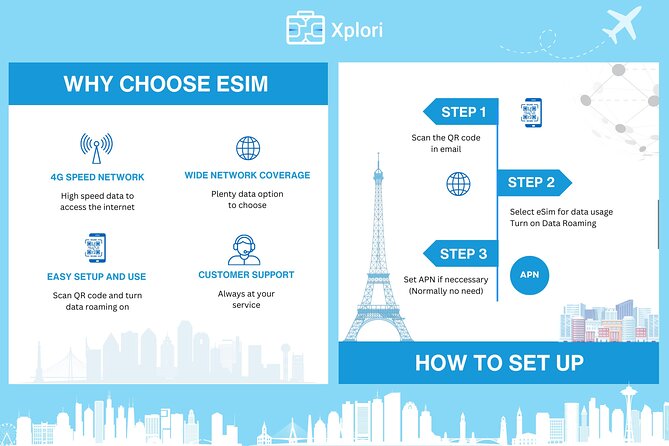
The basic process is:
- Confirm that your phone supports eSIM.
- Purchase the plan and wait for the email.
- Open the QR code on another screen, or print it.
- Add the eSIM through your phone’s mobile network settings.
- Install the profile on the day of departure.
- Keep your normal SIM available if you need it for calls or text messages.
- After arriving in Thailand, select the Thailand eSIM for mobile data.
- Enable data roaming for that eSIM.
The exact menu names vary by phone, but the principle is the same. Installing the profile and using the data plan are separate steps. You can add the eSIM before departure, then wait until arrival to turn on its data service.
Printing the QR code is a sensible backup. Carry it with your travel papers in case you need to reinstall the profile or troubleshoot the connection. Since the QR code is digital, do not assume you can retrieve it easily if your phone has no internet access.
Phone compatibility is the make-or-break detail
The provider specifically lists iPhone XS and later, Pixel 3 and later, and Samsung S20, S21, and Fold phones as examples of compatible devices. That list is useful, but it is not a substitute for checking your exact model and carrier status.
Your phone must support eSIM. It may also need to be unlocked for use with another network. The supplied information strongly advises asking before purchase if you are uncertain, and I would take that advice seriously.
You can usually find eSIM settings under mobile network or cellular settings. If there is no option to add a mobile plan or eSIM, your phone may not support the feature. Check before you leave home, when you still have time to choose a physical SIM or another solution.
Also check that your phone can keep your home SIM active while using the eSIM for data. The provided information does not promise dual-SIM behavior for every device, so avoid assuming that both lines will work in exactly the same way.
Same city, a completely different afternoon:
- Bangkok: Train Market & Floating Market with Boat Ride
★ 4.7 · 9,547 reviews - From Bangkok: Ayutthaya & Ayothaya Floating Market Day Trip
★ 4.7 · 6,084 reviews - Bangkok Canal Tour: 2-Hour Longtail Boat Ride
★ 4.5 · 5,909 reviews - Bangkok: Muay Thai Boxing Tickets at Rajadamnern Stadium
★ 4.9 · 4,740 reviews
What the connection is good for in real use
The strongest use case is everyday travel data. You can use maps to find your way around Bangkok, send WhatsApp messages, keep in touch with friends and family, and access basic travel information. One five-star experience specifically praised the connection speed and the convenience of being online as soon as the plane landed. Another praised the data performance and connection.
That is exactly where this product earns its low price. At $5 per person, the cost is small compared with the time and effort of arranging a SIM after arrival. The value is especially good if you want a short-term connection and do not need a Thai phone number.
The service is less suitable for heavy data use. A high-speed allowance of up to 60GB sounds generous, but the plan is not described as unlimited high-speed service. After the cap, the connection moves to 3G. You should be careful with cloud photo uploads, operating-system downloads, long video calls, and streaming.
To stretch the allowance, download maps or other large files over Wi-Fi before leaving. Set photo backup to Wi-Fi only. Avoid installing major app updates over mobile data. These small steps help preserve fast data for navigation and communication, which are the tasks you are most likely to need while moving around Bangkok.
The product includes remote customer service, which gives you a place to turn if setup goes wrong. Still, remote support is not the same as having someone beside you at an airport counter. Install early enough that you can ask questions before your flight.
How the $5 price compares in practical terms
The headline price is $5 per person, but the final value depends on the plan length and included data amount. A three-day option with a modest allowance may be ideal for a short stop in Bangkok. A longer plan with a larger allowance makes more sense if Thailand is part of a multiweek trip.
The low cost removes much of the risk. If your phone is compatible and you mainly need maps and messaging, the convenience can easily justify the purchase. You avoid a physical SIM purchase, do not have to remove your existing SIM, and can arrange service before leaving home.
Do remember that the package is data access only as described. It does not include a physical card, pickup, or a meeting. The supplied information also does not promise a Thai phone number, voice minutes, or SMS service. If you need those features, ask before buying.
There is one wording issue worth checking. The information says the data plan covers all Canadian provinces, which does not fit a Thailand eSIM. This may be leftover text from another product. I would confirm that your selected plan covers Thailand, including the areas you plan to visit, before purchase.
Timing, cancellation, and the small details that matter

The digital start time is shown as 12:00 am, but you should focus less on that label and more on the activation instructions. You are told to set up the eSIM on the same day as your departure, then activate the data plan and data roaming after reaching Thailand.
Do not install it at the last second. The email delivery may take time, and you need internet access for activation. Ordering the day before departure gives you room to print the QR code, check the phone settings, and contact remote support.
Free cancellation is available if you cancel at least 24 hours before the listed start time. A cancellation made less than 24 hours before the start time is not refundable, and late changes are not accepted. Cutoff times use local time, so keep that in mind if you are booking from another time zone.
Most people can use the product, provided their device is compatible. There is no physical meeting point, and the activity ends once the digital service has been delivered and used for the selected duration.
Who should choose this Thailand eSIM
I would choose this for a visitor who wants basic independence from the moment they arrive. It suits solo travelers, couples, families sharing directions, and anyone who dislikes airport paperwork. It also works well for a short Bangkok visit where a long-term Thai phone plan would be unnecessary.
It is a good fit if you use your phone for navigation, WhatsApp, Facebook, light browsing, and occasional trip planning. The positive experiences point to quick setup, good connection, and useful speed for ordinary travel tasks.
I would be more cautious if you depend on fast cloud photo backup or heavy streaming. The 3G fallback keeps you connected, but it may not handle large uploads well. I would also hesitate if you have not checked your phone model, if your device may be carrier-locked, or if you need calls and texts rather than data alone.
Should you book the Thailand eSIM?
Book it if your phone supports eSIM, you want data ready when you land, and your main needs are maps, messaging, social media, and trip planning. At $5, it offers strong convenience for the money, especially when you order early and install it over reliable internet.
Before booking, confirm the exact plan duration, high-speed data amount, Thailand coverage, and compatibility with your device. The Canada reference and the mixed 1-day versus 3-day wording deserve a quick check. If you need heavy photo uploads, plan to use Wi-Fi for those tasks.
For a prepared visitor with a compatible phone, this is a simple way to stay connected without a trip to an airport SIM counter. Just treat it as a practical data service, not unlimited high-speed internet.
FAQ
How long do the Thailand eSIM plans last?
The available options are described as lasting from 3 to 30 days. The general summary also mentions 1 to 30 days, so confirm the exact choices shown for your selected plan before booking.
How much high-speed data is included?
The Thailand eSIM offers options with up to 60GB of high-speed data. The exact allowance depends on the plan you select.
What happens after the high-speed data is used?
After you reach the stated high-speed data limit, the connection continues at 3G speed.
When should I set up the eSIM?
You should set up the eSIM on the same day as your departure. Install it while you still have internet access, then activate the data plan and enable data roaming after arriving in Thailand.
How do I receive the eSIM?
The eSIM is delivered by email. You scan the QR code to install the eSIM profile on your compatible phone.
Does my phone need to support eSIM?
Yes. The phone must support eSIM. Examples listed include iPhone XS and later, Pixel 3 and later, and Samsung S20, S21, and Fold models.
Is there a pickup location or meeting point?
No. This is a digital product, so there is no pickup or in-person meetup.
Can I cancel for a full refund?
Yes, if you cancel at least 24 hours before the experience start time. Cancellations made less than 24 hours before the start time are not refunded.
Just added around Bangkok
- Bangkok: Fallabella River Front Iconsiam★ 4.7 · 3 reviews
- Private Grand Palace Bangkok City Tour & Klong Longtail Boat Trip★ 4.5 · 3 reviews
- Bangkok: Divana Scentuara Spa Chidlom Branch E-Voucher★ 5.0 · 3 reviews
- Bangkok: Flower Market & Sunset Walking Tour★ 3.7 · 3 reviews
- Private Shore Excursion: Best of Bangkok in a day★ 3.5 · 3 reviews
- From Bangkok: Kanchanaburi, River Kwai and Erawan Waterfall Tour★ 3.0 · 3 reviews
- Private Damnoen Saduak and Maeklong Railway Market Tour(min 2pax)★ 5.0 · 3 reviews
- Damnoen Saduak Famous Floating Market and Mea Klong Railway Tour★ 5.0 · 3 reviews